

Every time you hire someone new, the same cycle repeats. You email forms, chase signatures, and manually re-enter information into payroll. Your new hire shows up on day one not knowing where to clock in. You're already behind before their first shift starts.
Employee onboarding tools can centralize paperwork, tasks, payroll setup, and related HR workflows, depending on the tool. This guide compares the top options for small businesses, with honest pricing, real user feedback, and a clear view of what each one is built for.
TL;DR: Best Employee Onboarding Software at a Glance
Our picks by use case. The best employee onboarding software for small businesses depends on what you're trying to fix:
- BambooHR: Best for HR-focused SMBs that want clean workflows and employee self-service
- Gusto: Best for payroll-first onboarding; new hire data flows straight to paychecks
- Rippling: Best for teams that also need IT provisioning alongside HR onboarding
- Trainual: Best for training-heavy onboarding and franchises with documented SOPs
- Workday: Best for enterprise teams managing global compliance at scale
Why Trust Homebase? Here's Why We Built This Employee Onboarding Guide
We're Homebase. We build scheduling, time tracking, hiring, onboarding, payroll, and team communication tools for hourly businesses. Basic scheduling and time tracking are free for one location with up to 10 employees; employee onboarding is included with All-in-One.
Homebase isn't in the ranked list below. Every tool was evaluated on its own merits. We do not accept payment for placement.
We've spent years watching small business owners juggle onboarding platforms that weren't built for their teams, and seeing how much the employee experience improves when paperwork, scheduling, and payroll connect in one place. That's what shapes this guide. See how Homebase compares below.
How We Chose the Best Employee Onboarding Software
Would a 10-person restaurant or retail store use this? That's the question we asked for every tool in this guide. The best onboarding software for small business has to be fast, mobile-friendly, and connected to how those businesses already run.
Our criteria:
- Ease of setup: No dedicated IT or HR help required.
- Core onboarding process: E-signatures, W-4/I-9 collection, document storage, task checklists.
- Payroll integration: Does new hire data flow to paychecks without manual re-entry?
- Mobile access: Essential for hourly and field teams who won't be at a desktop on day one.
- Pricing transparency: Is the free tier useful, or just a teaser?
- Verified user ratings: G2 and Capterra, checked July 29, 2026.
- Real user feedback: Including r/recruiting discussions such as this thread on BambooHR vs. Rippling.
See our full methodology for details.
Comparison Table: Top 3 Onboarding Software Picks
These three tools cover the most common small business onboarding needs: HR-first, payroll-first, and IT-connected. If you're wondering how much does onboarding software cost, this is the fastest way to compare starting prices, free-tier availability, and payroll integration across the top picks.
BambooHR
- Starting price: Core starts at $10/employee/month (25+ employees); $250/month minimum for 25 or fewer
- Free tier: No (free trial available)
- Best for: Office-based SMBs
- Payroll: Add-on
- G2: 4.4/5
Gusto
- Starting price: $49/month + $6/person (Simple plan)
- Free tier: No
- Best for: US-based small businesses
- Payroll: Native
- G2: 4.6/5
Rippling
- Starting price: Modular, quote-based
- Free tier: No
- Best for: Teams needing HR and IT together
- Payroll: Native (separate module)
- G2: 4.8/5
How Homebase Compares to HR and Onboarding Software
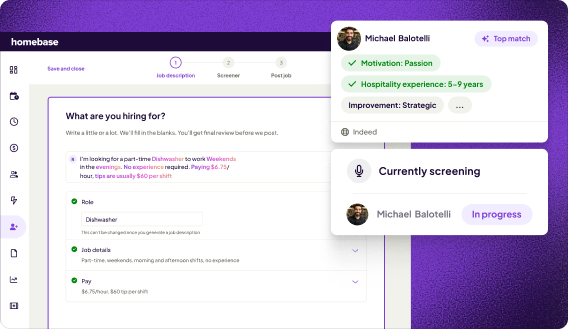
Most HR systems treat hiring and scheduling as two separate workflows. You onboard someone in one app, then add them to your schedule in another. For hourly teams, that gap costs real time.
In Homebase, a new hire completes their forms, gets added to the schedule, and clocks in for their first shift, all inside the same app. That's what sets it apart from team onboarding software that handles paperwork but leaves scheduling and payroll in separate tools. As payroll and onboarding software go, the connection matters: your new hire's hours feed directly into their first paycheck.
Employee onboarding is included with Homebase All-in-One at $96/location/month (annual) or $120/location/month (monthly). Unlike HR systems that charge per employee, Homebase charges per location, so the price stays flat whether you're onboarding two people or twenty.
Still chasing paperwork every time you bring on a new hire? Homebase connects hiring, onboarding, and scheduling from day one.
The Best Employee Onboarding Software, Ranked
These are the top picks for small businesses: an onboarding software comparison and onboarding management software guide covering who each tool works best for, verified ratings, real user feedback, and honest tradeoffs.
1. BambooHR: Best HR software for SMB onboarding.
Best for: Small and midsize organizations that want a centralized HRIS.
Rating: G2 4.4/5 (~5,990 reviews) · Capterra 4.6/5 (~3,500 reviews), checked July 29, 2026 Sources: G2 · Capterra
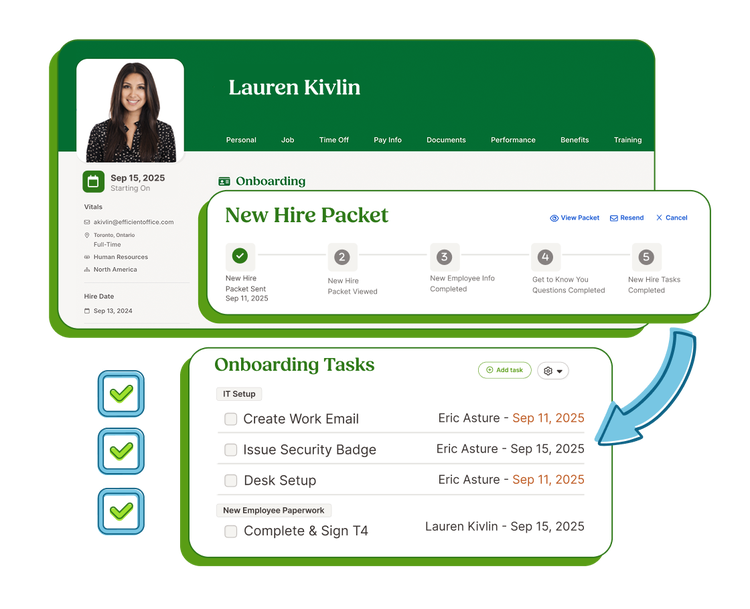
BambooHR is an HRIS that combines hiring and onboarding paperwork with broader HR management functions. Its onboarding module lets new hires sign documents, complete welcome tasks, and get oriented before day one. Core handles employee records, hiring, onboarding, and time off. Pro and Elite add performance management and additional employee-experience capabilities.
Key tools and capabilities:
- Customizable onboarding checklists and welcome task sequences
- E-signatures and new hire packet delivery before day one
- Employee self service portal for documents and PTO requests
- Applicant tracking included in Core, Pro, and Elite (5, 25, and 50 open jobs respectively)
- Preboarding can include offer communications, e-signatures, and assigned tasks before the start date
Pricing: Core starts at $10/employee/month for organizations with 25+ employees, and includes hiring and onboarding. Pro is $17/employee/month (adds performance management). Elite is $25/employee/month. Organizations with 25 or fewer employees pay a flat monthly rate starting at $250. Payroll, benefits administration, time and attendance, and global employment are separate add-ons. Verify at bamboohr.com/pricing before filing.
What users like: Capterra reviewers consistently describe BambooHR as smooth for day-to-day HR work. One verified reviewer noted it makes "employee records, time-off tracking, and onboarding... much smoother and more organized."
What users criticize: Some users flag limited customization for reports and workflows. One reviewer noted that certain capabilities "felt limited... especially when trying to tailor... workflows to specific organizational needs."
Our take: In our assessment, BambooHR offers one of the more polished HR-focused onboarding experiences in this comparison. Payroll and time tracking are separate add-ons, and the $250/month minimum makes it a steep entry point for teams under 25 people. Confirm your plan includes onboarding before signing.
2. Gusto: Best payroll-first onboarding for small business.
Best for: U.S.-based small and midsize businesses that want employee onboarding connected directly to payroll.
Rating: G2 4.6/5 (~12,008 reviews) · Capterra 4.6/5 (~4,217 reviews), checked July 29, 2026 Sources: G2 · Capterra
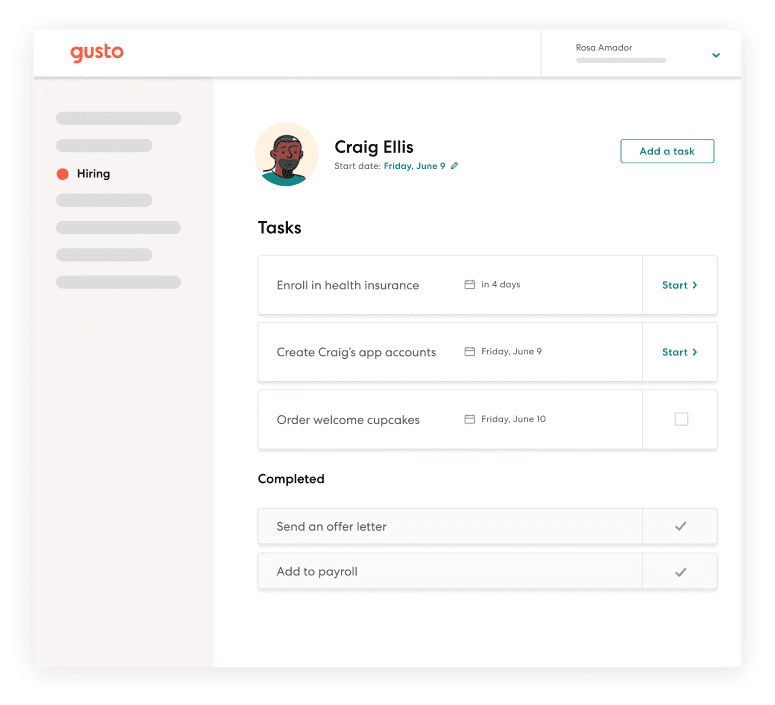
Gusto started as payroll and built HR around it, which means its onboarding is tightly wired to getting someone paid correctly. New hires can enter their W-4, I-9, and direct deposit details before day one, and that data flows into payroll without re-entry.
Employers remain responsible for reviewing identity documents and completing Form I-9 correctly. For a small business without a payroll specialist, this payroll-and-onboarding connection removes a whole category of manual errors.
Key tools and capabilities:
- Gusto can submit required state new-hire reports on an employer's behalf when filing is enabled
- Document e-signing, offer letters, and onboarding checklists on base plan
- Background check integration via Checkr; fees and eligibility may vary
- Benefits enrollment connected to the onboarding workflow when administered through Gusto
- Org charts, employee directories, app provisioning, and custom onboarding workflows on Plus plan
Pricing: Simple: $49/month + $6/person/month (single-state payroll). Plus: $80/month + $12/person/month (multi-state payroll included). Premium: $180/month + $22/person/month. No free tier and no per-location fee. Verify at gusto.com/product/pricing before filing.
What users like: Capterra reviewers describe Gusto's employee onboarding as straightforward and say it reduces paperwork time meaningfully. Several note the app is easy to use even for non-HR people.
What users criticize: Gusto's G2 and Capterra scores (4.6) differ substantially from its Trustpilot score of 2.1/5 from 2,477 reviews as of July 29, 2026. Negative Trustpilot reviews frequently mention support response and resolution times, though experiences vary.
Our take: For U.S.-based small businesses, Gusto is a clean onboarding-to-payday workflow. Best for teams with straightforward payroll needs. Businesses with tips, multiple states, or complex hourly rules should confirm that the selected plan covers their specific requirements.
3. Rippling: Best for HR and IT onboarding in one workflow.
Best for: Organizations that want HR, payroll, identity, app access, and device administration connected through one system.
Rating: G2 4.8/5 (~13,109 reviews) · Capterra 4.9/5 (~4,848 reviews), checked July 29, 2026 Sources: G2 · Capterra
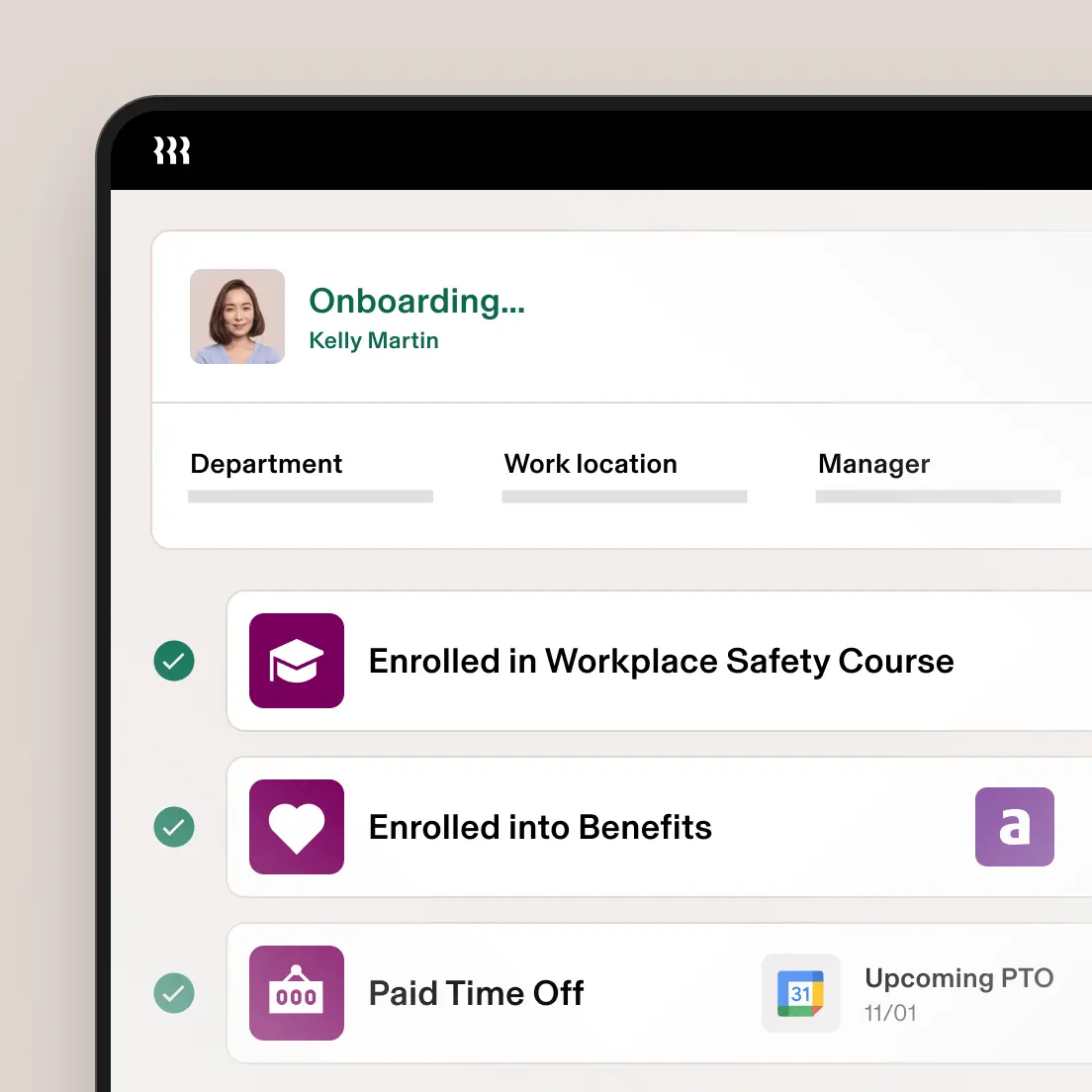
Rippling had one of the highest G2 and Capterra averages among the tools compared here. When you hire someone, and when the relevant IT products are purchased and configured, it can auto-provision email, app access, and device setup alongside standard HR paperwork, all from one trigger. That architecture is different from anything else in this comparison.
Key tools and capabilities:
- Automated onboarding workflows that trigger HR, IT, and payroll tasks together when relevant modules are enabled
- App and device provisioning alongside standard W-4/I-9 collection
- 600+ integrations including Slack, QuickBooks, and major HR apps
- Global payroll and employer-of-record capabilities (separate products)
- Learning and compliance-training capabilities through additional products
Pricing: Modular and quote-based. Rippling's core product is required, and payroll, benefits, time tracking, device management, learning, and global employment products add to the total. Contact Rippling at rippling.com/pricing for a current quote.
What users like: Capterra reviewers describe the onboarding process as "well organized" with clear guidance that made it easy to add employees and configure payroll without much support. Many cite the consolidation of HR, IT, and payroll as the biggest time-saver.
What users criticize: In the r/recruiting thread comparing these tools, practitioners flagged mixed experiences: costs that climb fast as modules are added, and some who'd tried Rippling switched to HiBob for its more customizable onboarding UX. Capterra reviewers separately flag stability issues and slow resolution times for complex problems.
Our take: Rippling earns its ratings. The automation is real. It's most compelling when an organization has enough HR and IT complexity to benefit from automating employee, app, and device workflows together.
4. Trainual: Best for new hire training and SOP-based onboarding.
Best for: Growing businesses, franchises, and multi-location operators that need to document SOPs and deliver role-based training as part of onboarding.
Rating: G2 4.7/5 (~1,074 reviews) · Capterra 4.7/5 (509 reviews), checked July 29, 2026 Sources: G2 · Capterra
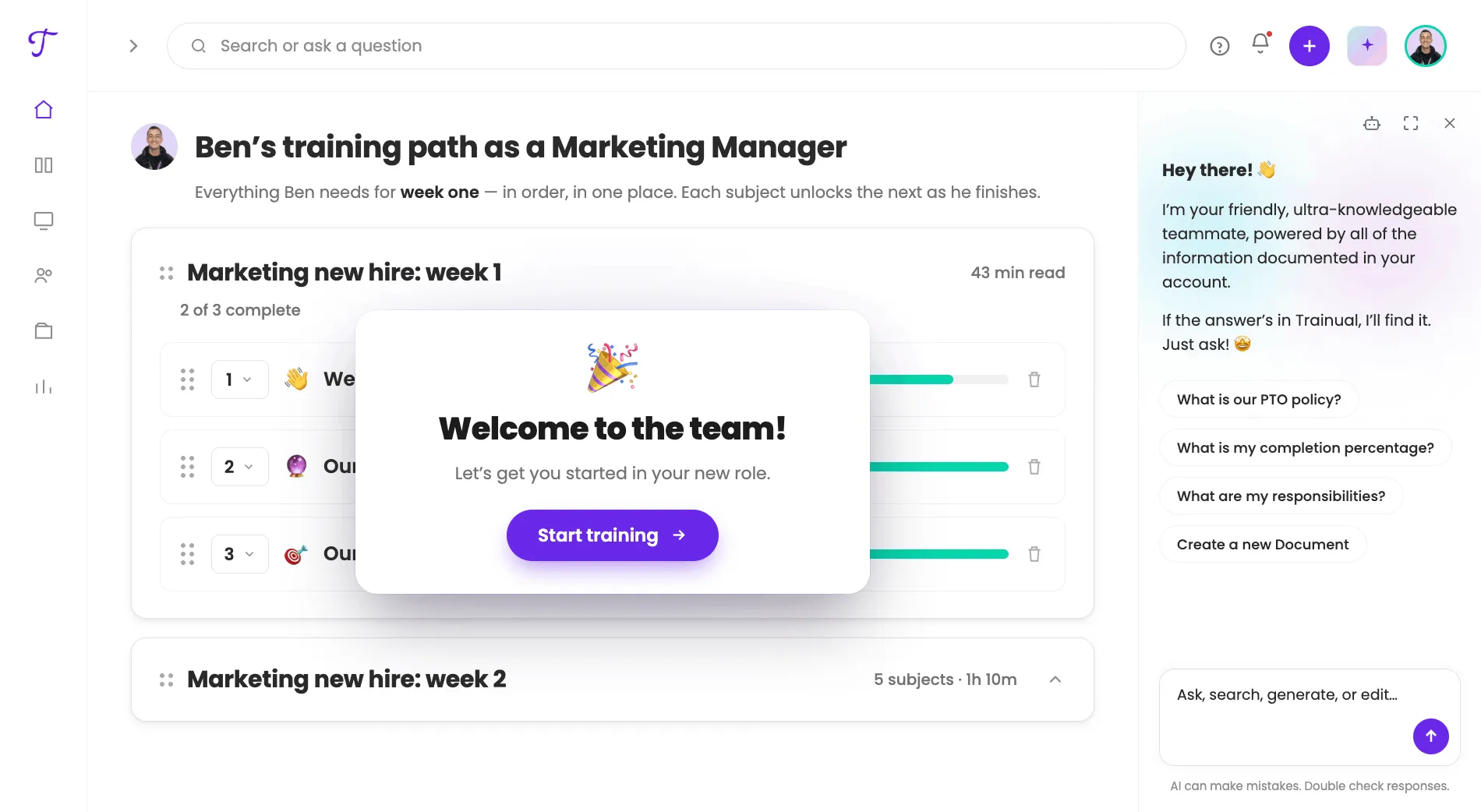
Trainual focuses on SOP documentation, knowledge management, and role-based training. It can collect policy acknowledgments and e-signatures, but it doesn't replace payroll or a full HRIS. New hires work through documented processes, role-specific training paths, and quizzes. Managers can see exactly where each person is stuck.
Key tools and capabilities:
- Role-based learning paths and SOP documentation
- Pre-built content templates and interactive quizzes to check comprehension
- Real-time progress tracking for managers
- Slack integration, native HRIS and payroll integrations, Google SSO, and API options, subject to plan
- AI-assisted content creation for building training materials faster
Pricing: Fully quote-based. Contact Trainual for a current quote based on team size, tools, and plan. A free trial is available. Verify at trainual.com/pricing before filing.
What users like: G2 reviewers praise how easy it is to build training modules combining text, images, video, and quizzes in one place. One reviewer called Trainual a "one-stop shop, reducing frequent questions and saving time for both employees and managers."
What users criticize: Trainual doesn't replace a dedicated HRIS. You'll still need separate tools for payroll, benefits, and tax compliance. Mobile usability should be tested during the free trial.
Our take: In our assessment, Trainual is the strongest option in this comparison for SOP-driven training and repeatable role-based onboarding. You'll need a separate tool for payroll and compliance. Strongest fit for franchises and multi-location businesses where consistency across every hire is the core problem.
5. Workday: Best enterprise onboarding tool at scale.
Best for: Larger or more complex organizations that need broad HCM, talent, analytics, and global-compliance capabilities.
Rating: G2 4.1/5 (~1,696 reviews) · Capterra 4.5/5 (~1,759 reviews), checked July 29, 2026 Sources: G2 · Capterra
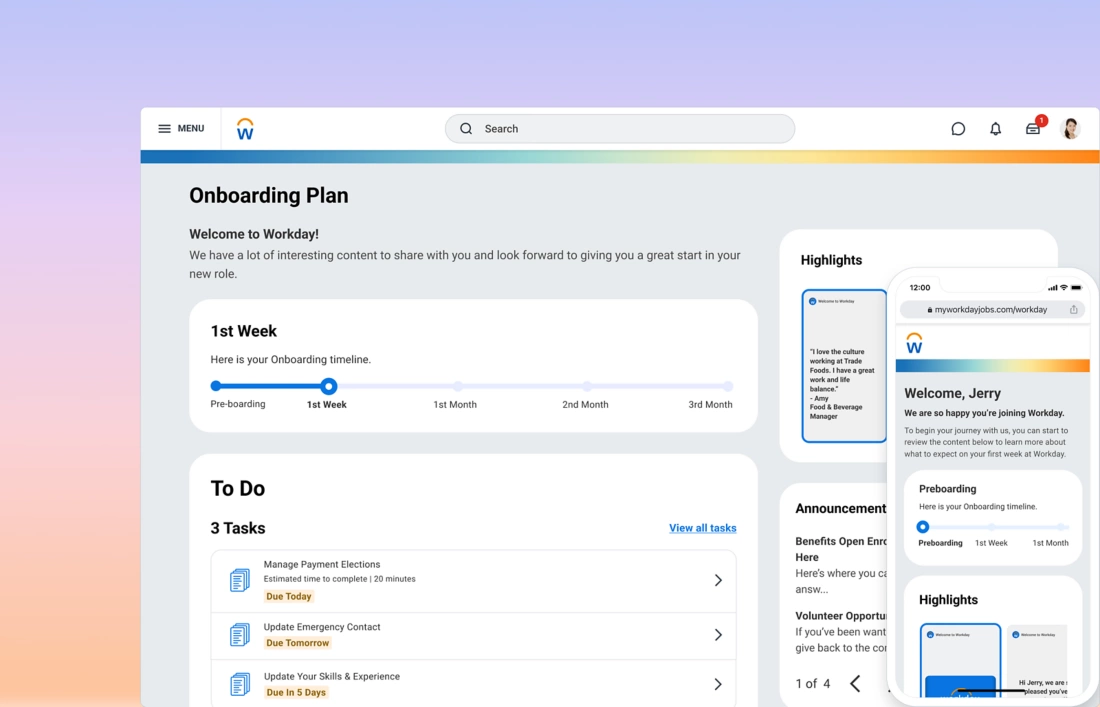
Workday is a major enterprise HCM system used by large companies, educational institutions, and government organizations. Its onboarding module sits inside a larger system covering payroll, talent management, global compliance, and advanced analytics. Workday generally suits organizations whose scale, global footprint, analytics requirements, or HCM complexity justify an enterprise implementation.
Key tools and capabilities:
- Tailored preboarding content, tasks, and self-service connected to recruiting and HCM data
- Connects with Workday HCM, recruiting, learning, payroll, and benefits, and can integrate with external IT and identity systems
- Analytics for onboarding plans, progress, and effectiveness
- Multi-location and multi-country support with localization
Pricing: Workday does not publish list pricing. Pricing depends on products, organization size, implementation scope, and contract terms. See Workday's contact page for a quote.
What users like: Capterra reviewers describe Workday as strong for onboarding task management, with requirements itemized and refreshed as each one is completed. One reviewer found it "excellent for onboarding task management" after joining a large organization.
What users criticize: G2 reviewers frequently cite complexity and a steep learning curve. Many note the system "can feel complex and overwhelming for new users, requiring time to learn."
Our take: Workday is well suited to organizations whose complexity, scale, or global requirements justify an enterprise implementation. For a small business, the setup cost and configuration time will outweigh the benefits.
The right onboarding software makes every first day better
Getting employee onboarding right matters more than most owners realize. The right onboarding tool doesn't just move paperwork online. It connects new hires to their schedule, their payroll, and their team from the moment they accept the offer.
A few things to keep in mind as you choose:
- Connect onboarding to payroll. Pick a tool that moves new hire data into your first payroll run without manual re-entry.
- Don't count on free tiers for compliance. They're useful for testing a tool, not for running I-9s and state new-hire reporting at scale.
- Size is a starting filter, not the final answer. A 50-person restaurant group has different onboarding needs than a 50-person tech startup.
If you run an hourly team and you're still chasing onboarding forms every time you hire, try Homebase. Hiring, onboarding, scheduling, and time tracking connect from day one.
“The small investment of upgrading to Homebase All-in-One feels like it added our own human resources staff. New Hire Onboarding and HR Pro have saved us the time that we can better spend growing our business.” — Kim Redeker, Owner, Sweet Granada
Frequently asked questions about employee onboarding software
What is the best software for employee onboarding?
The best onboarding software depends on your team size and what you're trying to fix. For hourly small businesses, our top onboarding software picks are Homebase for a scheduling-connected workflow and Gusto for a payroll-first workflow. BambooHR fits SMBs focused on HR culture and compliance. Rippling leads for teams that need HR and IT unified. Workday handles enterprise complexity.
What are the 4 C's of employee onboarding?
The widely cited framework has four C's: Compliance, Clarification, Culture, and Connection. Some organizations use expanded versions that add a fifth concept such as Check-in, but those are adaptations rather than the original. Good onboarding tools automate compliance and clarification tasks, and create structure to support culture and connection.
Is there free employee onboarding software?
None of the ranked tools currently offers a full, permanent employee-onboarding plan at no cost. Homebase offers free basic scheduling, time tracking, job posts, and applicant tracking for one location with up to 10 employees; onboarding is a paid All-in-One feature. BambooHR and Trainual offer trial access.
What should I look for in onboarding software?
Start with the basics, then build up based on your team's needs:
- Core features: E-signatures, W-4/I-9 collection, document storage, task checklists
- Payroll connection: New hire data should flow to paychecks without re-entry
- Mobile access: Essential for hourly and field teams who won't be at a desktop on day one
- Compliance tracking and analytics: More important as your team grows
How long does employee onboarding usually take?
Onboarding commonly extends beyond first-day orientation and may last several weeks or months, depending on the role and organization. Admin paperwork can wrap in the first few days with digital forms and e-signatures. Businesses should define their own milestones rather than assuming a universal timeline.

Josh Dunton is a Lead Talent Acquisition Advisor at Homebase, with over 12 years of talent acquisition experience at companies like Shopify, Wealthsimple, Moneris, and Vidyard. He specializes in technical recruiting, talent strategy development, and leading high-performing recruitment teams. Earlier in his career, Josh built talent acquisition strategies and implemented a referral program that drove over 40% of new hires. This gave him unique insight into the hiring challenges small business owners face every day.

Josh Dunton is a Lead Talent Acquisition Advisor at Homebase, with over 12 years of talent acquisition experience at companies like Shopify, Wealthsimple, Moneris, and Vidyard. He specializes in technical recruiting, talent strategy development, and leading high-performing recruitment teams. Earlier in his career, Josh built talent acquisition strategies and implemented a referral program that drove over 40% of new hires. This gave him unique insight into the hiring challenges small business owners face every day.
